
Moire shows what changed.
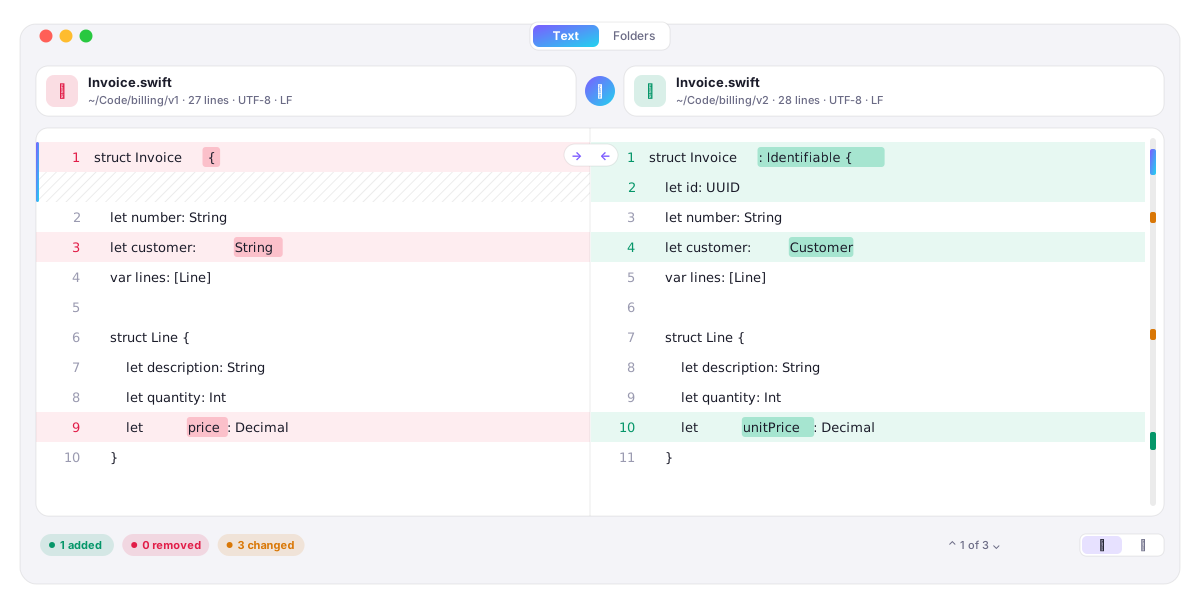
A native Mac app for comparing text, files and folders. Lines line up across both sides, and the exact words that changed are marked.
Install Moire
curl -fsSL https://sherin.dev/moire/install.sh | bash- DownloadMoire.zip
- ChecksumSHA-256 matches SHA256SUMS
- Installed/Applications/Moire.app
Installs Moire.app for macOS 15 or later.
What it does
Side by side or unified.
Changed lines sit next to their new version, with the changed words marked.
Copy changes across.
Take a change from either side; saving keeps the file's own encoding and line endings.
Jump between changes
with the keyboard, or click a mark in the change map beside the scroll bar.
Paste or type.
No files needed: paste two snippets and the comparison updates as you type.
Compare folders.
Every file in both folders is compared by its contents; double-click one to see what changed.
Fast on big files.
Myers' algorithm in linear space, the idea behind git diff, off the main thread.
Downloads
Latest release
- Mac, Apple Silicon and IntelMoire.dmg
- The app on its ownMoire.zip
- ChecksumsSHA256SUMS
Details
Needs
macOS 15 or later
Runs on
Apple Silicon and Intel
Written in
Swift and SwiftUI
Licence
MIT