Tagwell: MP3 tags, nothing else.
A small, native Mac app for editing the tags of one MP3 or hundreds at once. It writes only the fields you change; the audio and the rest of the tag stay exactly as they were.
Install Tagwell
curl -fsSL https://sherin.dev/tagwell/install.sh | bash- DownloadTagwell.zip
- ChecksumSHA-256 matches SHA256SUMS
- Installed/Applications/Tagwell.app
Installs Tagwell.app for macOS 15 or later.
What it does
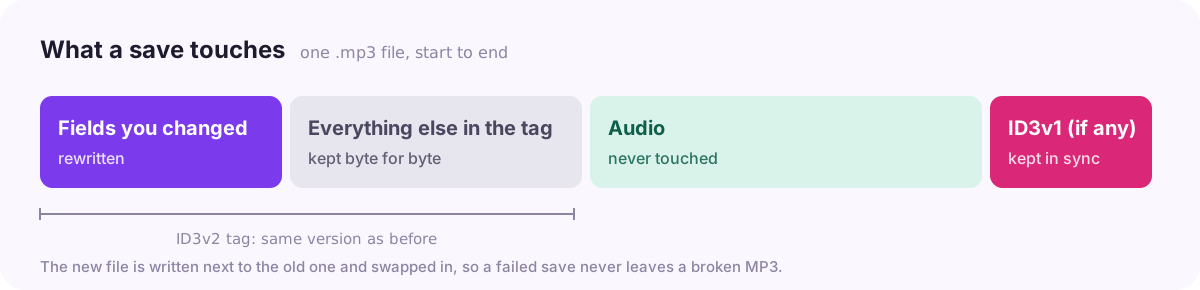
Only what you changed is written.
MusicBrainz IDs, iTunes data, lyrics and ratings stay byte for byte, and the tag keeps its ID3 version.
Bulk edit.
Select a hundred files and set the artist, album, year or cover art once. Number tracks or turn file names into titles in one click.
Artist folders.
Drag files onto an artist in the sidebar to set their artist. Saved artists come back as suggestions, so a name is spelled the same everywhere.
Cover art from YouTube.
Search for the track and pick a thumbnail, or let Tagwell find the video in a yt-dlp file name. Cropped to a square by default.
Rename on save, if you want.
Files can take the name Artist - Title. An existing file is never overwritten.
Safe saves.
Files are written in the background with a progress window, next to the original and swapped in, so a failed save never leaves a broken MP3.
Downloads
Latest release
- Mac, Apple Silicon and IntelTagwell.dmg
- The app on its ownTagwell.zip
- ChecksumsSHA256SUMS
Details
Needs
macOS 15 or later
Runs on
Apple Silicon and Intel
Written in
Swift and SwiftUI
Licence
MIT